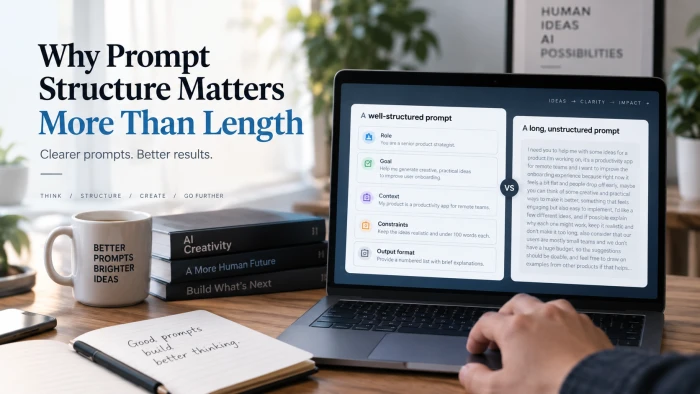
Why Prompt Structure Matters More Than Length
The 30 second version• A prompt is the message you type into an AI tool. Longer does not mean better.• AI...
Both apps now edit uploaded photos by chat. OpenAI shipped ChatGPT Images 2.5 this week, and Google runs Nano Banana 2 and Nano Banana Pro inside Gemini. Here is how they compare on the things that matter for editing real photos.

Quick answer Pick Gemini if you edit a lot of photos on a free account, want 4K output, or blend several photos into one scene. Pick ChatGPT if you want the most controlled step by step editing, sketch and comment tools, and results with no visible watermark. Both keep faces recognisable far better than they did a year ago. Neither replaces a full editor such as Photoshop or Lightroom for colour grading, layers, masks or RAW files. |
Both companies replaced their image models more than once this year. The names below are what you get in the consumer apps today.
CHATGPT ChatGPT Images 2.5 Released 8 September 2026. It replaces Images 2.0, which launched on 21 April 2026 and was itself a full model replacement with better text rendering and multilingual support. Available to all ChatGPT tiers, including free, on web, desktop and mobile. Also available in ChatGPT Work and Codex. OpenAI says generation latency is up to 50 percent lower than Images 2.0. The update targets three editing problems: keeping the subject from a reference photo, changing only what you asked for, and holding quality across many rounds of edits in one chat. New product features shipped with it: Sketch, templates, comments placed on images, and sharing an image together with its prompt. OpenAI reports more than 3 billion images created per week across ChatGPT and its image API. | GEMINI Nano Banana 2 and Nano Banana Pro Nano Banana is Google's name for the Gemini image models. The first version (Gemini 2.5 Flash Image) arrived in August 2025 and was built around keeping people and pets looking like themselves across edits. Nano Banana Pro (Gemini 3 Pro Image) followed as the high quality tier, with output up to 4K and reliable text in several languages. Nano Banana 2 (Gemini 3.1 Flash Image) launched on 26 February 2026 and is now the default model in the Gemini app. Google positions it as Pro level quality at Flash speed. In the app you choose Fast, Thinking or Pro from the model menu. Thinking lets the model plan before rendering. Pro routes to Nano Banana Pro. Paid subscribers can regenerate any result with the Pro model using the three dot menu and Redo with Pro. Image generation is available in every language and country where the Gemini app is available. |
Nano Banana 2 is the default image model in the Gemini app. Image: Google announcement.
The basic loop is the same in both: upload a photo, describe the change, review, then ask for more changes in the same chat. The details differ.
CHATGPT Editing in ChatGPT 1. Open a new chat and attach the photo with the plus button. You can attach more than one photo if you want elements from each. 2. Type the edit in plain language. Be specific about what should stay the same. 3. To target one area, open the generated image and place a comment on the spot you want changed, then describe the change. 4. To guide layout or pose, type @Sketch and draw a rough outline. ChatGPT uses the drawing as a reference alongside your text. 5. Keep editing in the same conversation. Images 2.5 is designed so each new edit builds on the previous one without losing quality. 6. Download the result. There is no visible watermark. Content credentials are embedded in the file. | GEMINI Editing in Gemini 1. Open the Gemini app or gemini.google.com and pick Create images from the tools menu. 2. Choose Fast, Thinking or Pro. Free accounts mostly run on the standard model. 3. Upload one photo, or several if you want to blend them, and describe the edit. 4. Describe the area in words. There is no click to point tool, so say where the change should happen and what should stay untouched. 5. Ask for follow up changes in the same chat. Gemini keeps the earlier image in context. 6. On a paid plan, use Redo with Pro if the standard result is not sharp enough or you need 4K. 7. Download the result. It carries a small visible watermark and an invisible SynthID mark. |
Figures are as published by each company or reported by independent reviewers at the time of writing. Usage limits change often.
| ChatGPT | Gemini | |
|---|---|---|
| Current model | ChatGPT Images 2.5 | Nano Banana 2 (default), Nano Banana Pro (paid) |
| Launched | 8 September 2026 | 26 February 2026 (Nano Banana 2) |
| Edit by uploading a photo | Yes | Yes |
| Point to the area to change | Yes, comments placed on the image | By description in the prompt |
| Draw a reference | Yes, Sketch tool | No dedicated sketch tool |
| Blend several photos | Multiple reference images supported | Yes, a headline feature since 2025 |
| Planning mode | Thinking models on paid plans plan the image first | Thinking mode in the app, thinking levels in the API |
| Max resolution | Not published for the app | Up to 4K with Nano Banana Pro |
| Aspect ratios | Horizontal, square, vertical | Wide range including 4:1, 1:4, 8:1 and 1:8 |
| Images per prompt | One | Typically a set of results |
| Transparent background | Yes, in Images 2.5 | Not a published app feature |
| Visible watermark | No | Yes, plus invisible SynthID |
| Invisible provenance | C2PA metadata and invisible watermark | SynthID |
| Free plan | Limited and slower image generation, no fixed count published | Roughly 20 images per day on the standard model, small Pro allowance |
| Entry paid plan | ChatGPT Go, around $8 per month | Google AI Plus, $7.99 per month |
| Standard paid plan | ChatGPT Plus, $20 per month | Google AI Pro, $19.99 per month |
| Top plan | ChatGPT Pro, $100 and $200 tiers, unlimited images | Google AI Ultra, $249.99 per month |
Edge: ChatGPT
The biggest complaint about chat based editors was that asking for one small change rebuilt the whole picture. A request to fix the lighting on a wall would come back with a different face, a different shirt and a slightly different room. Both companies have worked on this through 2026.
OpenAI describes Images 2.5 as better at editing only what you asked for while keeping the rest of the details the same, including with complex subjects and busy backgrounds. The examples in its launch post cover full body outfit edits and changing one line of text on a ticket without touching the rest of the design.
Comments are the practical difference. You can now place a note directly on part of an image and describe the change there. That removes the guesswork of writing the top left corner behind the lamp and hoping the model reads it the same way.
Multi turn consistency is the other change. In a long conversation, earlier edits are more likely to stay in place and each new edit builds on the last without the image slowly degrading. Independent coverage on launch day described this as the first version where an edit, review, edit again workflow holds together.
Gemini handles local edits by description. Google's own examples cover changing a background, replacing an object or adding an element while keeping the rest of the photo intact. It also supports applying the style of one image to another, which is useful for matching a set of photos.
Thinking mode helps with complicated instructions. When it is on, the model reasons through the prompt before rendering, which Google says improves prompt adherence on multi part requests.
What Gemini lacks is a way to point. Every location has to be written out. For simple edits that is fine. For a crowded photo with several similar objects it takes more attempts.
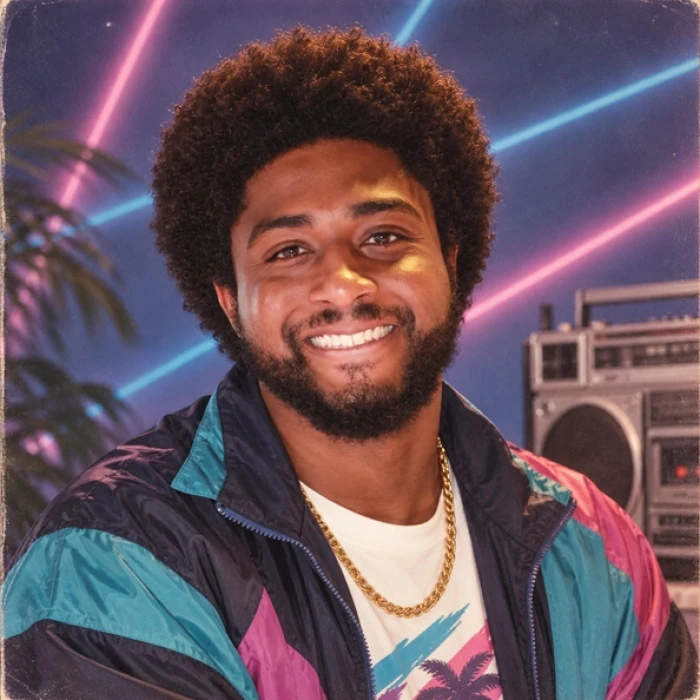
A photo restyled with ChatGPT Images 2.5 using a shared prompt. Image: OpenAI announcement.
Close: both strong
Face drift is the main reason people gave up on AI edits of family photos. A year ago both tools would return a stranger who looked a bit like the person, and the resemblance got worse with every follow up edit.
The original Nano Banana release in August 2025 was built around this problem. Google said the update was designed so photos of friends, family and pets look consistently like themselves, whether you change a hairstyle, an outfit or the whole scene. Nano Banana 2 kept that focus and added higher fidelity. Reviewers through 2026 have repeatedly rated Gemini as one of the most consistent tools for realistic people.
Images 2.5 is aimed at the same problem. OpenAI says subjects from reference photos look more recognisable, lighting and textures feel more natural, and distinctive features are more likely to carry through into new settings and styles. Its launch examples include a child's portrait remixed into new scenes and a photobooth photo turned into a headshot.
One reported limitation is that the identity anchoring works within a conversation. There is no saved face profile you can reuse across chats, so a recurring character has to be re-uploaded each time.
We ran a set of long prompts that asked the model to keep an uploaded face and rebuild everything else: outfit, jewellery, setting and lighting. ChatGPT held the likeness while producing detailed fabric and embroidery. Gemini produced comparable likeness on the same prompts. Neither was perfect on every run, which is why generating more than once still matters.
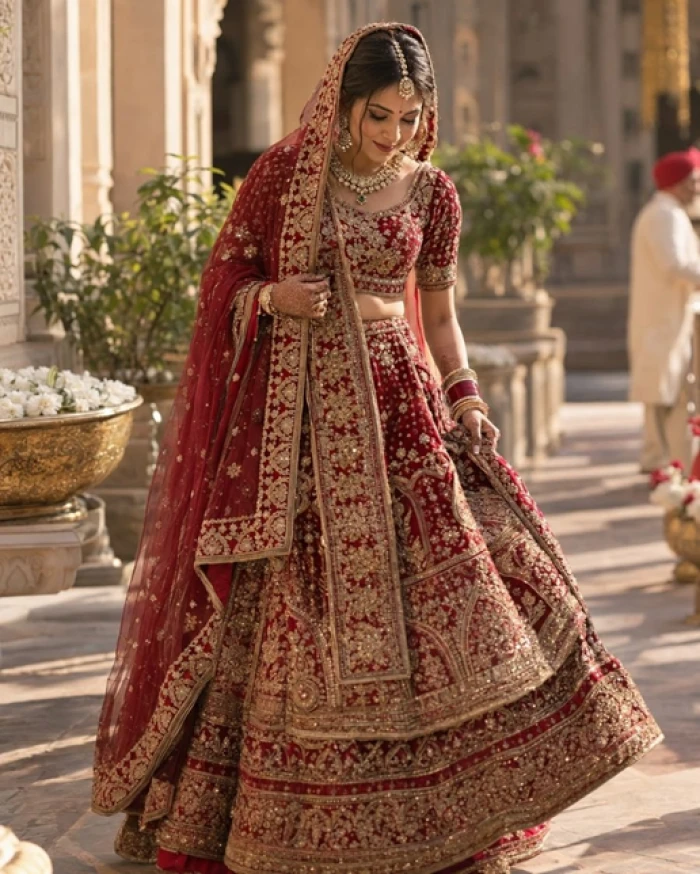
Generated with ChatGPT from one uploaded reference photo and a text prompt. Outfit, setting and lighting came from the prompt.
Close, depending on mode
ChatGPT was the slower tool for most of 2025 and early 2026. Images 2.5 cuts latency by up to 50 percent compared with Images 2.0 according to OpenAI. Free accounts are still described as slower than paid ones on OpenAI's pricing page.
Gemini's Fast mode on Nano Banana 2 is built for quick iterations. Google added a 512 pixel resolution tier specifically to minimise latency for rapid drafts, and a developer partner reported a roughly 75 percent latency reduction after moving to Nano Banana 2. Pro mode is slower because it reasons before rendering and outputs at higher resolution.
In practice, both return a standard edit in well under a minute on a paid plan. Thinking modes on either side add time in exchange for better prompt adherence.
Edge: Gemini for resolution
Gemini is the only one of the two that publishes a resolution ladder. Nano Banana models offer 512 pixel, 1K, 2K and 4K output, with 4K reserved for Nano Banana Pro. That makes it the safer choice for print or large crops.
OpenAI does not publish a maximum resolution for images made inside the ChatGPT app. Output is high enough for social media and screens. If you need a specific pixel size, the API is the place to set it.
ChatGPT offers horizontal, square and vertical formats. Gemini supports a wider set, and Nano Banana 2 added extreme ratios such as 4:1, 1:4, 8:1 and 1:8 for banners and tall panels.
Both models render legible text now, which was not true two years ago. OpenAI's Images 2.0 made text rendering and multilingual text a headline feature. Google's Nano Banana Pro is known for accurate text in multiple languages, and Nano Banana 2 can translate text inside an image, which Google calls in-image localisation.
For photo editing this matters when you want to change a sign, a label or a ticket in a photo without redrawing the rest.
Edge: Gemini
Gemini gives free users more image edits per day. Google describes the free allowance as approximately 20 images per day on the standard model, resetting at midnight Pacific time. Nano Banana Pro is mostly reserved for paid plans, with a small daily allowance for free users before the app switches back to the standard model.
OpenAI does not publish a fixed image count. Its pricing page describes the free tier as limited and slower image generation, Go as including image generation, Plus as expanded and faster, and Pro as unlimited. Independent trackers in August 2026 observed only a few images per day on free accounts, though the exact number moves with demand.
| Tier | ChatGPT | Gemini |
|---|---|---|
| Entry | ChatGPT Go, around $8 per month, includes image generation | Google AI Plus, $7.99 per month, adds a daily Redo with Pro allowance |
| Standard | ChatGPT Plus, $20 per month, expanded and faster images | Google AI Pro, $19.99 per month, higher daily cap and regular Pro access, 2 TB storage |
| Top | ChatGPT Pro, $100 and $200 tiers, unlimited and faster images | Google AI Ultra, $249.99 per month, highest caps plus video and YouTube Premium bundle |
Two extra points on the Google side. Google AI Studio, the developer console, has its own separate quota and its output does not carry the visible watermark. And business Google Workspace accounts have needed a paid add on for Nano Banana Pro since March 2026, so a work account may see fewer features than a personal one.
Edge: ChatGPT, if you want clean output
Every image created or edited in the Gemini app carries a visible watermark in the corner plus Google's invisible SynthID mark. The visible mark stays on paid consumer plans. Google's stated reason is to make a clear distinction between AI visuals and original human work.
ChatGPT output has no visible watermark. OpenAI attaches C2PA content credentials and an invisible watermark so the image can still be identified as AI made by tools that check for them. Both companies also run safety checks on prompts and uploads, so some edits of real people will be refused.
For personal use the visible mark rarely matters. For anything you plan to publish, sell or print, it is a real difference, and cropping it out is against Google's terms.
CHATGPT Sketch: draw directly in ChatGPT and use the drawing as a layout guide. Type @Sketch to start. Useful for room layouts, poses and where objects should sit. Templates: starting points for popular formats such as Poster, Merch and product photos, with fields for the details you want included. Comments on images: mark a spot and describe the change there. Shareable prompts: share an image with the prompt attached so others can run it on their own photos. Transparent backgrounds: supported in Images 2.5, which helps when cutting out products or people for composites. Web reference in thinking mode: paid thinking models can look up real world references before generating. | GEMINI Fast, Thinking and Pro modes: trade speed for quality per request. Redo with Pro: upgrade any result to the Pro model on paid plans. Up to 4K output: useful for print and large crops. Photo blending: combine several uploaded photos into one scene, for example placing two people from different photos together. Style transfer: apply the look of one image to another. Web grounded visuals: the model can pull reference detail from search for real places and objects. Google AI Studio: a separate developer surface with its own quota and no visible watermark. |
If you are building photo editing into an app rather than using the chat, both models are available by API.
OpenAI released two API models alongside Images 2.5. GPT-Image-2.5 Flare is the default, with the same quality and editing gains at 50 percent lower latency than GPT-Image-2. GPT-Image-2.5 Sunburst is the premium option with tighter control across edits and longer generation times. Adobe has added the 2.5 models to Firefly, and Higgsfield and Runway have integrated them.
Google offers Nano Banana 2 and Nano Banana Pro through the Gemini API, Google AI Studio and Vertex AI. Developer controls include configurable thinking levels, the full aspect ratio list, the 512 pixel to 4K resolution ladder and web grounded image search. A paid API key is required for Nano Banana 2 in AI Studio.
Pricing on both sides is per image and varies by resolution. Check the current pricing pages before estimating costs, since both companies changed image pricing during 2026.
Both tools regenerate the image rather than editing pixels. That has consequences worth knowing before you rely on them.
• No non destructive editing. There are no layers, masks or history you can step back through. Each result is a new file.
• No RAW or colour management. Neither reads RAW files or works in a managed colour space. Skin tones and colours can shift slightly between edits.
• Fine detail can change. Small text, logos, jewellery and patterns may be redrawn even when you asked for them to stay. Check the parts you did not mention.
• Results vary between runs. The same prompt gives different output each time. Generate more than once and keep the best.
• Content rules apply. Both refuse some edits of real people, especially anything that could mislead, and both may decline edits involving public figures.
• Upload limits. Very large files are downscaled on upload, so start from a good quality original rather than a screenshot.
Either. Both now hold likeness well. Try the same photo in both and keep the one that looks most like the person.
Gemini. The daily allowance is larger and published.
ChatGPT. Comments on the image and stronger multi turn consistency make long editing sessions easier.
Gemini with Nano Banana Pro on a paid plan for 4K output.
ChatGPT. Gemini app output carries a visible watermark.
Gemini. Blending is a core feature and works from the free tier.
Either. Both render text well now. Gemini can also translate text inside the image.
ChatGPT, for transparent background output.
ChatGPT, using Sketch.
Bottom line There is no single winner for every job. The gap between the two has narrowed to workflow and pricing differences rather than image quality. • Gemini wins on access: more free edits, a cheaper path to 4K, photo blending built in, and a wider set of aspect ratios. • ChatGPT wins on control: point and comment editing, sketch input, transparent backgrounds, and edits that survive many rounds without degrading. • Face likeness is now close: Google solved it first, OpenAI matched it this week. Test with your own photo before committing. • Speed is close: Images 2.5 removed ChatGPT's old disadvantage. Fast mode keeps Gemini quick for drafts. • Watermarks decide it for publishers: Gemini app images carry a visible mark, ChatGPT images do not. If you pay for one of them already, use that one. If you pay for neither, start with Gemini for volume and switch to ChatGPT for the edits that need precision. |
The 30 second version• A prompt is the message you type into an AI tool. Longer does not mean better.• AI...
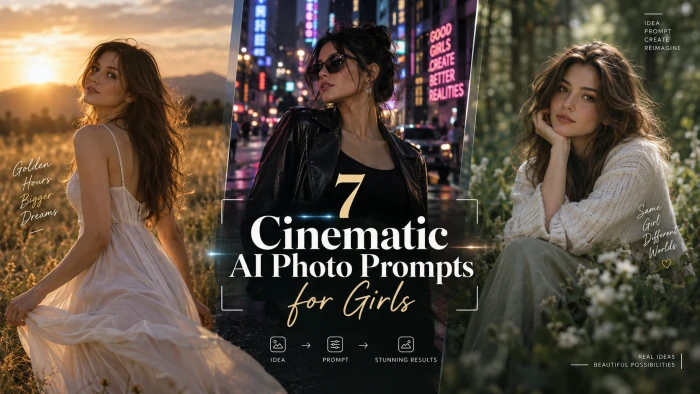
PROMPT COLLECTION7 Cinematic AI Photo PromptsEditorial portraits built from one reference photo, styled seven ways.The seven portraits in th...
The tool matters less than the habit. Bring your own picture, change one thing at a time, and keep the full resolution file.Google Gemini, p...
Discussion
Join the discussion and share your thoughts below.
No comments yet. Be the first to share your thoughts!